How AI Agents Actually Work Today, and the Problem They All Share

Disclosure: This post reflects independent personal experimentation and my own hands-on work on personal open-source projects. It reflects only my personal views, is not professional advice, and does not represent any organization, employer, or official position.
If you have been hearing about "AI agents" and wondering what people actually use to run them, this post is for you. I want to walk through the main ways you can use an agent right now, from the biggest commercial products everyone has heard of down to the self-hosted options for people who want to run their own. Then I want to explain the problem that all of them share, and what to do about it if you are putting real data through an agent.
You do not need to be a programmer to follow this. I am going to explain the technical bits as we go.
What is an agent, in plain English?
An AI agent is the difference between a calculator and an assistant. A calculator answers when you ask. An assistant goes off and does things, comes back with results, remembers what you talked about yesterday, and gets better at helping you over time.
When you type a message into ChatGPT and it answers you, that is a chat app doing one turn at a time. When you ask an agent to "look at my email, summarize what is urgent, draft replies to the easy ones, and put the rest on a list for me to look at later," that is something different. The agent has to remember the conversation, use tools (reading your email, drafting messages, making lists), make decisions, and keep going across multiple steps. That is what an agent is.
The companies and projects that build the software for running these agents take very different approaches. Some run the whole thing in their own cloud and you just talk to them through a website. Some give you a program you install on your own computer that does the work locally. Some are fully open source and let you run everything yourself on your own hardware. The choices matter because they determine where your data lives, what you can do with it, and how much you can prove about what your agent did.
Let me walk through the main options.
The cloud-hosted commercial products
The biggest and most widely used agents today are the commercial products from OpenAI, Anthropic, Google, and Microsoft. Most of them run in the vendor's cloud. You log in through a website or a mobile app, you have a conversation, and the work happens on their servers.
ChatGPT is OpenAI's flagship product. Hundreds of millions of people use it. It has a memory feature that remembers information about you across conversations (your preferences, your projects, your context) and surfaces that information in new chats. You can see what it remembers in the settings, edit it, delete specific memories, or turn the feature off. The memory lives entirely on OpenAI's servers.
Codex is OpenAI's coding-focused product. It exists in three forms: as a feature inside ChatGPT, as a command-line tool you install on your computer (called Codex CLI), and as a desktop application. The local versions run on your machine but still talk to OpenAI's servers for the AI part. Codex can read your code, suggest changes, run commands, and work on programming tasks autonomously.
Claude is Anthropic's flagship product. Similar shape to ChatGPT: a website and apps where you have conversations. Claude has its own memory feature (introduced more recently) plus a related feature called Projects, which lets you group related conversations together and give Claude persistent context about a specific topic. Like ChatGPT memory, this all lives in Anthropic's infrastructure.
Claude Code is Anthropic's coding tool. It runs in your terminal on your own machine, similar to Codex CLI, but it talks to Anthropic's servers for the AI work. It can read and modify files, run commands, manage git operations, and handle complex coding tasks over many steps.
Gemini is Google's flagship AI product. The consumer Gemini app and the web interface have memory features comparable to ChatGPT and Claude, with information stored in Google's infrastructure. Gemini fits the cloud-hosted commercial pattern in its native app, but it plays a slightly different role in the broader agentic landscape: Gemini's native app does not currently support MCP (the standard protocol that lets agents talk to external services). Instead, Gemini shows up most often as a model provider, where agent runtimes like Claude Code, OpenClaw, Hermes Agent, and ZeroClaw use Gemini through Google's API as the AI brain while the runtime itself handles tools, channels, and any MCP-based integrations. So Gemini is two things at once: a chat product with the same memory pattern as the others, and an AI model that powers other agents.
Microsoft Copilot is Microsoft's flagship AI product. It exists across the Microsoft ecosystem: in Windows, in Microsoft 365 apps (Word, Excel, Outlook, Teams), as a standalone chat product, and as developer tools like GitHub Copilot. Copilot has its own memory features tied to your Microsoft Graph data, plus MCP extensibility that lets it connect to external services through the standard protocol. The shape is similar to ChatGPT, with the difference that Copilot is built around Microsoft's product surface: it makes the most sense if your organization already runs on Microsoft 365, Azure, and Windows.
These six products are what most people who use AI agents are actually using. They are easy to start with: you sign up, you start typing, and the company on the other end handles everything else. The model is good, the integration is smooth, the user experience is polished. For personal use, for individual productivity, for getting your feet wet with what agents can do, they are excellent.
The cost of this convenience is that you do not own the substrate. Your memory lives on the vendor's servers. Your data passes through their systems. If you want to switch from ChatGPT to Claude (or vice versa), your accumulated memory does not come with you. If you want to deploy any of this for a business with regulatory or data residency requirements, you have to negotiate with the vendor about where your data lives and what they will agree to. The vendor owns the keys to the kingdom because the kingdom lives in their cloud.
This is fine for personal use. It becomes a problem the moment you need to do something the vendor's product was not designed for.
When you want to run it yourself
If you want to run an agent on your own hardware, with your own data, with your own choice of AI model, you move into a different category of software: open-source self-hosted agent runtimes. These are programs you install on your own computer (or your own server) that do the agent work locally, talk to whichever AI model you choose, and store everything on hardware you control.
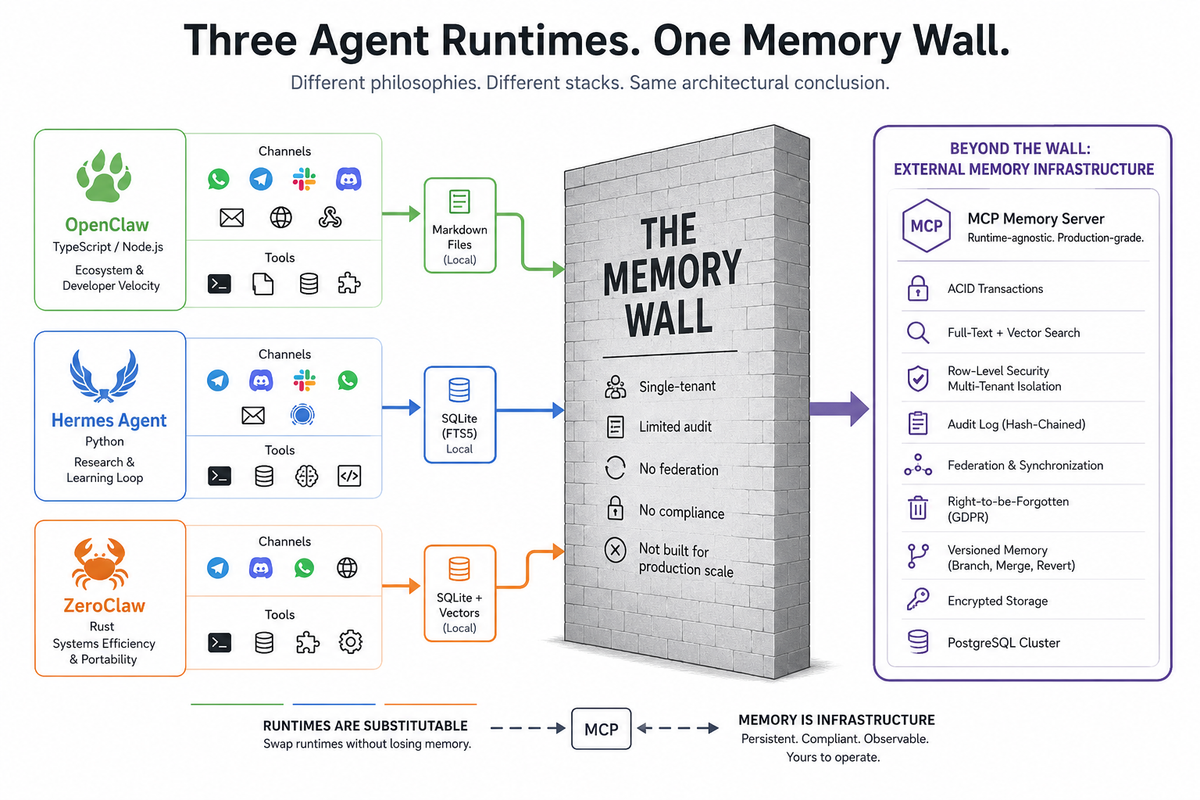
Three open-source projects have emerged as the serious options here: OpenClaw, Hermes Agent, and ZeroClaw. They look like they do the same thing. They actually represent three very different philosophies about how the work should be done, and the differences matter when you have to pick one.
Before I introduce them, a quick detour into why the programming language they are written in makes a difference.
The programming language question
When a company runs software in their cloud, you do not care what programming language they wrote it in. They handle the hardware. You just use the product.
When you run software on your own hardware, the language matters a lot. Different programming languages have different tradeoffs. Some are easy to write but use a lot of computer memory and run slower. Some are harder to write but use very little memory and run very fast. The choice directly affects what kind of computer you need to buy or rent, and how much it costs to keep the thing running.
The three open-source runtimes are written in three different languages, each chosen for different reasons:
JavaScript (specifically TypeScript on something called Node.js) is the most common language on the web. Easy to learn, massive ecosystem of pre-built components, lets developers move quickly. The downside is that JavaScript needs Node.js to run, which itself consumes a lot of memory before your program does anything useful. Think of Node.js as the engine that JavaScript needs to start, and the engine itself is heavy.
Python is the language that won machine learning and AI research. Most AI tools, training code, and research projects are in Python. It is friendly and the ecosystem for AI work is enormous. It is also not particularly fast and uses meaningful amounts of memory, though less than JavaScript on Node.js.
Rust is a newer language designed for systems that need to be fast and use very little memory. Harder to write than JavaScript or Python, but the resulting program is small, fast, and difficult to crash. Rust is what people use when they want the program itself to be as efficient as humanly possible.
This matters for self-hosted agents because they have to run continuously, often for days or weeks at a time, often on hardware you are paying for monthly. The language choice is not aesthetic. It determines how much it costs to run the thing.
OpenClaw: the popular one
OpenClaw is the agent runtime that made the self-hosted category mainstream. Started in late 2025 by Peter Steinberger, who previously built a successful software company called PSPDFKit. By early 2026, OpenClaw had over 200,000 stars on GitHub, the highest measure of attention the open-source world has.
OpenClaw is written in TypeScript and runs on Node.js. The reason it grew so fast is that Node.js is what most web developers already know, the ecosystem of pre-built components is huge, and the documentation made it accessible to people who had never built agents before. It connects to messaging platforms (WhatsApp, Telegram, Slack, Discord, Signal, email), runs tools (shell commands, file operations, web browsing), and works with whichever AI model you point it at.
OpenClaw stores its memory in plain text files in a folder on your computer, formatted as Markdown (a simple writing format). Your agent reads these files to remember things and writes to them when it learns something new. The filesystem becomes the database.
The cost of OpenClaw's approach is resource overhead. Running it usually requires a decent-sized server with plenty of memory: a Mac mini, a virtual server with 2 GB of RAM or more, or something equivalent. Node.js consumes around 390 megabytes of memory just to start, before your agent does any work. That is fine if you have hardware to spare. It is a problem if you do not.
What OpenClaw does well: ease of getting started, massive ecosystem, every messaging channel and tool you might want, and a developer experience that lets non-systems-engineers build real things.
Hermes Agent: the research-grade one
Hermes Agent is built by Nous Research, a smaller AI research lab. Nous Research makes its own AI models (the Hermes family of language models, which give the agent its name), and the agent is partly designed to generate training data for those models. The team is not chasing market share; they are doing research.
Hermes Agent is written in Python. Python is the natural choice because everyone in AI research already speaks it, and because the agent integrates with the lab's broader work on training models from agent behavior.
Hermes Agent stores its memory in a small embedded database called SQLite, which is the same database that runs inside your phone's photo app or your web browser. It is a real database, more sophisticated than plain text files, but it lives inside the agent's process and is not designed to be shared across multiple machines.
The discipline around Hermes Agent is notably careful. The team has documented its security thinking publicly, supports container-based isolation, has a separate Rust-based security scanner called Tirith that checks shell commands for dangerous patterns before they run, and built in features like graduated trust levels that accumulate over time rather than asking for approval on every action. It is the most cautious of the open-source projects in this space.
What Hermes Agent does well: security thinking, integration with research workflows, and a learning loop that genuinely makes the agent more capable the longer you use it.
ZeroClaw: the efficiency one
ZeroClaw is the architectural response to "Node.js uses too much memory." Where OpenClaw needs hundreds of megabytes of RAM, ZeroClaw runs in under eight megabytes. Where OpenClaw needs seconds to start up, ZeroClaw starts in under ten milliseconds.
ZeroClaw is written in Rust. The whole program ships as a single small file that weighs about 3.4 megabytes. The same file works on different kinds of computer chips (Intel/AMD, ARM, RISC-V) without recompilation. You can run ZeroClaw on a Raspberry Pi, on a $10 single-board computer, or on a phone-class device, and it will still work well.
ZeroClaw stores memory in SQLite (similar to Hermes Agent) plus a more sophisticated search system that combines keyword matching and semantic similarity (finding things that mean roughly the same thing even if they use different words). It has a feature that imports OpenClaw's memory files directly, which acknowledges that people might want to switch from one runtime to the other and keeps the data portable.
The architectural philosophy is what software engineers call "trait-based" or "modular." Every piece of the system (the AI model connector, the messaging channels, the tools, the memory storage) can be swapped out by changing a configuration file rather than rewriting code. This makes ZeroClaw flexible: you can replace any part of it with a different implementation without breaking the rest.
What ZeroClaw does well: extreme efficiency, deployment on small hardware, security as a design priority, and modularity that makes substitution genuinely easy.
The five paths, the same wall
So you have a spectrum of options for how to use an AI agent today.
At one end, you can use ChatGPT, Claude, Gemini, or Copilot in the browser or mobile app. The vendor handles everything. Your memory lives on their servers. The experience is polished but the substrate is theirs.
In the middle, you can use the local versions of Codex (the CLI or the desktop app) or Claude Code. These run on your computer but still rely on the vendor's AI models in their cloud. Your memory is local to your machine, organized into project files and configuration files specific to each tool.
At the other end, you can self-host with OpenClaw, Hermes Agent, or ZeroClaw. You run everything on your own hardware, pick your own AI models, and store memory in whichever local format your runtime uses (Markdown files for OpenClaw, SQLite for Hermes Agent and ZeroClaw).
These look like different choices for different situations. They are. But every single one of them has the same problem the moment you try to use them for something beyond personal productivity.
The problem is memory at scale.
ChatGPT memory works for one person on one account. It does not let you run agents for thousands of customers with strict isolation between them. It does not give you the audit trail that compliance demands. It does not let you deploy the memory layer on your own infrastructure for regulatory reasons. The memory lives in OpenAI's cloud and that is where it stays.
Claude memory and Claude Projects work the same way. Excellent for personal use, bound to Anthropic's product, not portable to your own infrastructure or to a multi-customer deployment.
Gemini's memory is in Google's cloud, tied to your Google account. Same constraints, different vendor. And because Gemini's native app does not currently support MCP, you cannot directly attach an external memory layer to the Gemini consumer product the way you can attach one to Claude or to Copilot. Gemini's path into the operator-controlled memory world runs through using Gemini as a model provider behind an agent runtime that does support MCP.
Copilot's memory lives in Microsoft's cloud, tied to your Microsoft Graph data. The MCP extensibility means you can attach external services to Copilot, which is more flexible than the Gemini consumer product. But the memory layer itself still belongs to Microsoft, scoped to your Microsoft 365 environment, not portable outside it.
Codex (CLI or desktop) and Claude Code keep memory in local files on your machine. Fine for one developer working on one project. Not designed for a team sharing memory across machines, not built to survive when you switch from one tool to the other, not equipped to prove to anyone what the agent did when.
OpenClaw stores memory in Markdown files on your filesystem. This works for one user on one machine. It does not work when you have two customers sharing the same agent, because their memories are in the same files. There is no isolation. No audit. No way to prove to a customer that their data did not leak to another customer.
Hermes Agent stores memory in SQLite inside its own process. This works for one agent on one machine. Two instances on two servers do not share what they have learned. No federation between sites. No hash-chained audit trail that survives review.
ZeroClaw's memory is the most architecturally sophisticated of the open-source three. It supports a real database backend and the modular design means you can swap in different memory storage. But the default deployment is still local, single-instance, single-tenant. Federation is not a built-in feature. The audit chain is not part of the design.
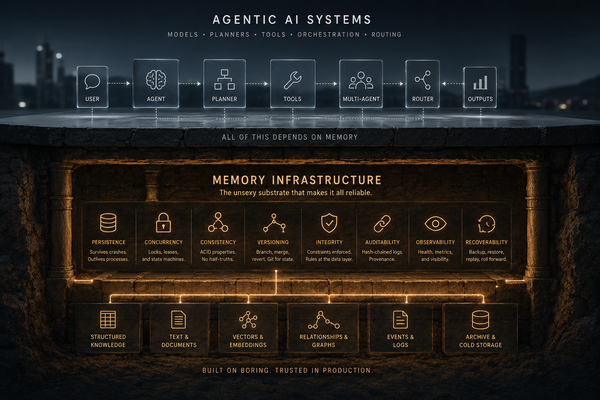
The wall is the same because all of these tools are doing the same thing: building memory as a feature of the agent product, not as a separate piece of infrastructure. ChatGPT memory is a feature of ChatGPT. Claude memory is a feature of Claude. Gemini memory is a feature of Gemini. Copilot memory is a feature of Copilot, scoped to Microsoft Graph. Claude Code's memory is a feature of Claude Code. The open-source runtimes each have their own memory layer baked into the runtime. None of them have memory as a separate, properly-managed service that you own and can move.
For personal use, this is fine. For business use, it eventually breaks.
Why memory belongs outside the product
The agentic AI world is slowly rediscovering something the database world figured out forty years ago: serious data infrastructure does not belong inside the application that uses it.
When you visit a website, you do not store its data inside your web browser. The browser is the application; the data lives in a database somewhere else. When you use Slack, Slack the app on your phone is not where your messages are stored; the messages live on Slack's servers, and the app talks to them. This separation lets the app be lightweight, lets the data be shared across many apps, lets the data be backed up and audited and protected independently of the app.
Agent memory works the same way. The agent (whether it is ChatGPT, Claude Code, OpenClaw, or anything else) should run the agent loop, use tools, talk to AI models, handle channels. The memory should be a separate service that the agent talks to. When the memory is a separate service, it can be properly managed: backed up, audited, encrypted, replicated, isolated per customer, deleted on request, federated between sites.
The protocol that makes this practical is called MCP, which stands for Model Context Protocol. It is the standard way for an agent to talk to external services. Claude Code uses it. Claude Desktop uses it. Codex (CLI and desktop) supports it. Copilot supports it through its extensibility model. OpenClaw, Hermes Agent, and ZeroClaw all support it. The notable exception is Gemini's native consumer app, which does not currently support MCP. To use MCP-based memory with Gemini, you run Gemini as the model provider behind an MCP-capable agent runtime. An MCP memory server is an external program that any MCP-aware agent can talk to whenever it needs to remember something or recall something it learned before.
The architecture that survives production is the same regardless of which agent you started with:
- The agent (commercial or open-source) handles the work that agents do: tools, models, channels, decisions.
- An external MCP memory server handles persistent memory, audit, multi-tenancy, federation, compliance.
- The two talk to each other over MCP.
This means you can use Claude Code on Monday and switch to ZeroClaw on Tuesday without losing your memory. You can run the same memory layer behind a Codex deployment and an OpenClaw deployment so the two agents share context. You can deploy the memory layer in a regulated environment that ChatGPT could never enter, while still using ChatGPT for the parts of your workflow where it is the right tool.
The memory is the asset. The agent is the interface to that asset. Treating them as separate things is what production deployments do.
What this means in practice
If you are using ChatGPT, Claude, Gemini, or Copilot for personal productivity, this does not affect you today. Use what works. The vendors handle your data well enough for personal use.
If you are using Claude Code or Codex (CLI or desktop) for your own coding work, on your own machine, this still does not affect you much. The local memory is fine for one developer working alone.
If you are running any kind of agent for a business (multiple users, customer data, compliance requirements, the need to prove what happened) the built-in memory of any of these tools will eventually fail you. Not catastrophically, usually. Gradually, in ways that become a problem when you have to demonstrate to a customer that their data is safe, to a regulator that you can prove what your agent did, or to yourself that the memory survives when something restarts.
The fix is the same in all cases: an external MCP memory server. The agent runtime or product stays. The memory moves outside, into a system designed for that job.
The architecture is the same regardless of which agent you picked. The runtime handles the agent. The memory server handles the memory. They talk to each other over MCP.
The agents are not the problem. They are good at being agents. The memory problem is a different problem that deserves its own solution.
A note on what comes next
If you are putting real data through an agent (any agent, ChatGPT or Claude or one of the open-source runtimes) the question is not whether you need external memory infrastructure. It is which one, and how soon.
Full disclosure: I have been building one. It is called MNEMOS, it is Apache 2.0 licensed (free and open source), and it lives at github.com/mnemos-os. It works with every MCP-capable agent discussed in this post (Claude, Claude Code, Codex, Copilot, OpenClaw, Hermes Agent, ZeroClaw) and through the OpenAI-compatible interface for tools that speak that protocol. Gemini fits in when used as the AI model behind any MCP-capable runtime.
There are other options in the category. The architectural argument in this post applies regardless of which one you choose. The point is that the memory belongs outside the agent. Whatever you pick, pick something that lives at the right layer of the stack.
Your agent will forget things. The agent companies are not going to solve that problem for you, because solving it would mean rebuilding their products around an architecture that does not match how their products are designed. The opportunity to make agents actually remember is on the operator side of the stack now, and the operators who recognize that early will be ahead of the ones who do not.